Health at a glance
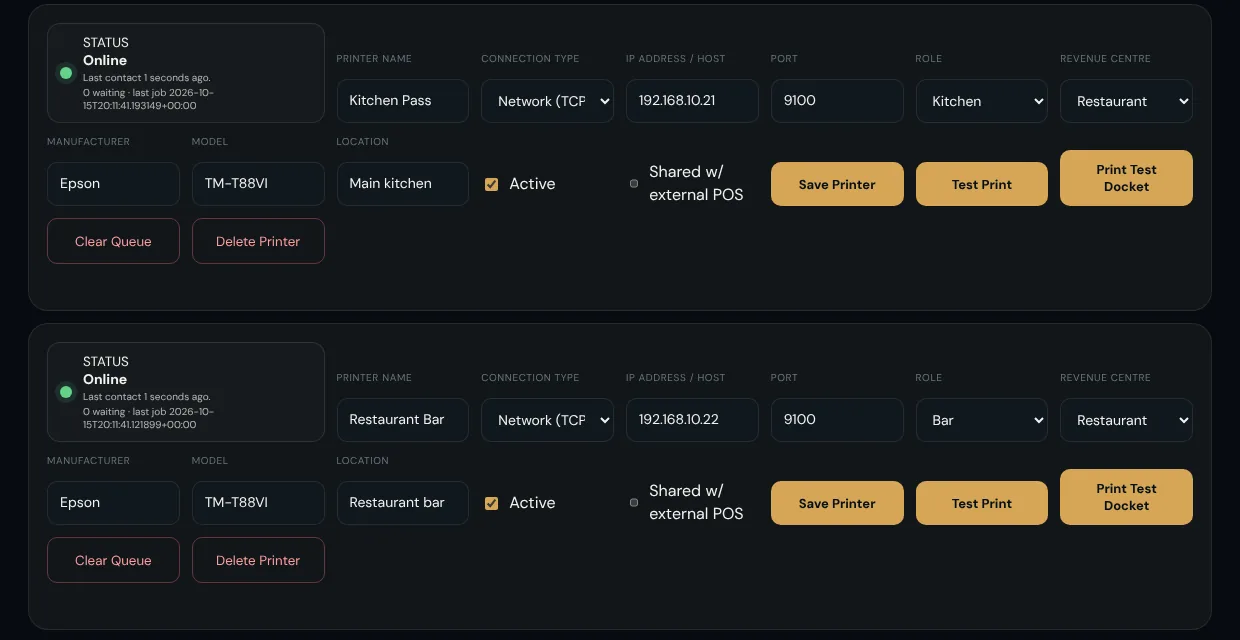
See which printers are online, when each last checked in, and how many dockets are waiting.
Kitchen & bar
Gustara prints each item where it should be made, only after payment is confirmed, and tells you plainly when a printer needs attention.
================================
ORDER 10014
DATE / TIME 15/10/2026 18:46
REVENUE CENTRE Restaurant
AREA Main Restaurant
TABLE MAIN2
--------------------------------
1 x Salt & Pepper Calamari
  NOTE: No nuts please
1 x 8oz Sirloin Steak
1 x Classic Beef Burger
================================
================================
ORDER 10014
DATE / TIME 15/10/2026 18:46
REVENUE CENTRE Restaurant
AREA Main Restaurant
TABLE MAIN2
--------------------------------
2 x Cappuccino
1 x Hot Chocolate
================================
One order, two dockets: the kitchen and the bar each get only their own items.
Routing
An item's destination is decided by where the guest is and what they ordered. Configure it once per Revenue Centre, refine it per Area, and override it for a single table if you need to.
| Revenue Centre | Categories | Prints on |
|---|---|---|
| Restaurant | Starters, Mains, Sides, Desserts | Kitchen Pass |
| Restaurant | Soft Drinks, Cocktails | Restaurant Bar |
| Pool Bar | Everything | Pool Bar Printer |
| Room Service | Everything | Room Service Pass |
Illustrative routing for a fictional demo hotel.
The docket
Every docket carries the order number, time, Revenue Centre, Area and table, then each item with its quantity, options and the guest's note.
Dependable under pressure
Printers run out of paper, lose their network and get unplugged. Gustara is designed to keep a clear head when they do.
See which printers are online, when each last checked in, and how many dockets are waiting.
A docket that fails to print goes back in the queue and tries again. After repeated failures it is marked Print Failed so nobody assumes it was served.
If a connection drops mid-ticket, the outcome is genuinely unknown. Gustara flags it for a person instead of printing a duplicate behind your back.
Clear a stuck queue with a confirmation that names exactly which dockets will go. New orders that arrive meanwhile are never swept up.
Check a printer with a quick test, or print a realistic sample ticket to see your layout with real-looking items.
Staff can reprint a customer receipt, and shift or management reports print to the same thermal printers.
How printers connect
A lightweight bridge program runs on a computer in your venue. It reaches out to Gustara for waiting dockets and sends them to the printer over your local network.
Live printing is network (TCP) today. Other connection types can be recorded in setup, and we will confirm the right arrangement for your hardware during your walkthrough.
Share your models and layout and we will confirm exactly how Gustara would route and print for your outlets.